> ## Documentation Index
> Fetch the complete documentation index at: https://docs.shanone.ai/llms.txt
> Use this file to discover all available pages before exploring further.
# Skills
> Save a reusable, step-by-step workflow once in Shanone and reuse it from any machine, IDE, or agent.
## What is a Skill?
A **Skill** is a named, reusable instruction set — conceptually close to [Anthropic's Agent Skills](https://www.anthropic.com/news/skills). Each Skill has three fields:
| Field | Purpose | Limit |
| -------------- | ----------------------------------------------------------------------------------------------- | ------------------------ |
| `name` | Short, descriptive title | 1–200 characters |
| `summary` | What the Skill does and when to use it — this is the lightweight metadata shown in list results | Up to 2,000 characters |
| `instructions` | The full step-by-step body — only fetched when the Skill is actually opened | Up to 100,000 characters |
Shanone itself never *executes* a Skill. The **Skill Vendor** is a storage-and-retrieval layer: your agent lists and reads Skills through MCP, then follows the `instructions` in its own context, calling `shanone_execute_tool` (or anything else it needs) along the way. This keeps Skills portable across whatever agent happens to be reading them — Cursor today, Claude Code tomorrow, on a different laptop next week.
Skills are stored server-side (Shanone's Skill Vendor backend), not in a local file. Save one once and it's available everywhere your account connects. They're per-user, not shared across a team — see [Permissions & Access Control](/product-guide/permissions) for how access to Shanone as a whole is managed.
## Why Skills exist
Give the same multi-step instructions once, save them, and reference them by name afterward
A Skill created from Cursor is immediately readable from Claude Code, or any other MCP client on your account
Listing Skills only returns lightweight metadata (`name` + `summary`) — full `instructions` are fetched only when a Skill is actually opened, keeping token usage low
Skills you create via MCP also appear under **Skills** in the Shanone web UI, and vice versa
## The Skill Vendor tools
| Tool | Description |
| ---------------------- | ------------------------------------------------------------------------------- |
| `shanone_list_skills` | List saved Skills (metadata only), optionally filtered by `query`, newest first |
| `shanone_get_skill` | Get a Skill's full `instructions` by `skill_id` |
| `shanone_create_skill` | Save a new Skill (`name`, `description`, `body` all required) |
| `shanone_update_skill` | Update an existing Skill — only non-empty fields are changed |
| `shanone_delete_skill` | Permanently delete a Skill |
`query` in `shanone_list_skills` is a simple, case-insensitive substring match against `name` and `summary` only — it doesn't search inside `instructions`, and there's no semantic/embedding search. Use short, exact keywords from the Skill's title rather than a vague description.
If you're integrating from outside MCP (e.g. a script or a backend service using an API key directly), the same functionality is available as a plain REST API under `/api/v1/skills` (`POST`/`GET` for listing and creating, `GET`/`PUT`/`DELETE` on `/api/v1/skills/{skill_id}` for a single Skill) — the MCP tools are a thin wrapper around it.
## Recommended workflow
Before starting a non-trivial task, call `shanone_list_skills` (optionally with a `query` filter) to see if the workflow already exists.
If a match exists, call `shanone_get_skill` with its `skill_id` to get the full instructions.
Your agent executes the steps itself in its own context — using `shanone_search_tools` / `shanone_execute_tool` for any integration actions the instructions call for.
Once you've done something worth reusing, call `shanone_create_skill` so it's available next time, from any agent.
## Example
```
User: "Save this as a skill called 'Weekly Status Report'."
Agent calls shanone_create_skill with:
name: "Weekly Status Report"
description: "Gathers last week's closed GitHub issues and posts a summary to Slack #team."
body: |
1. Use shanone_execute_tool with github_list_issues to fetch issues closed in the last 7 days.
2. Summarize them into 3-5 bullet points.
3. Use shanone_execute_tool with slack_post_message to post the summary to #team.
```
A week later, from a different machine:
```
User: "Run my Weekly Status Report skill."
Agent calls shanone_list_skills, finds it, calls shanone_get_skill,
then follows the instructions — calling github_list_issues and slack_post_message itself.
```
## Managing Skills from the dashboard
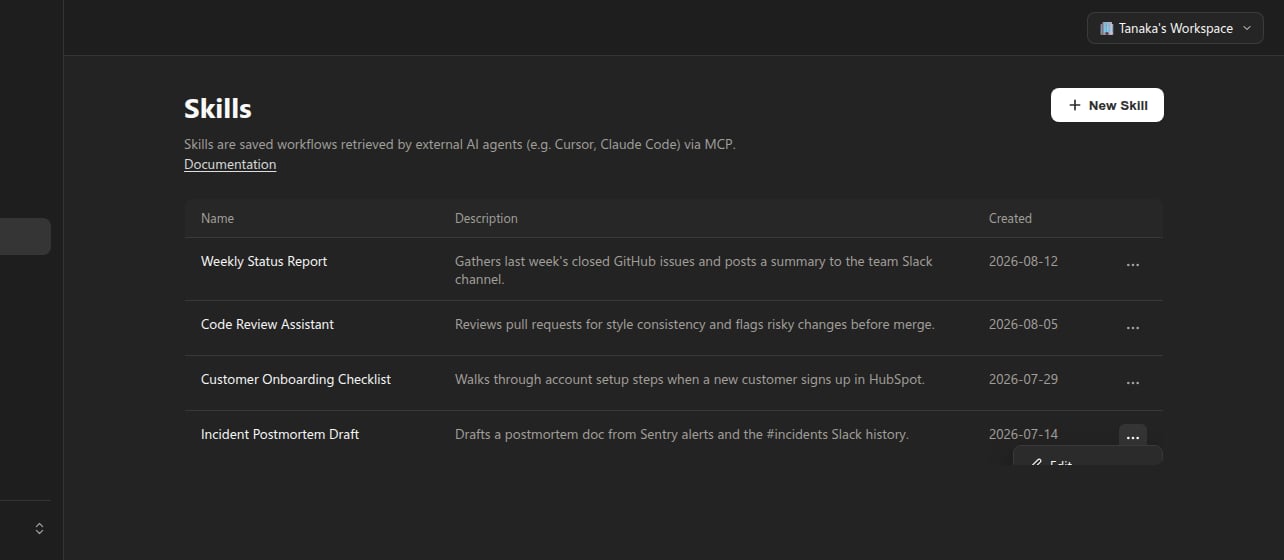
Everything you can do over MCP is also available under **Skills** in the Shanone web dashboard — useful for writing longer instructions by hand, or just reviewing what your agents have saved on your behalf.
 Opening a Skill (or clicking **New Skill**) gives you a name field, a description field, and a body editor with three tabs — **Code** for the raw Markdown, **Preview** for the rendered version, and **Blame** for change history (editing an existing Skill only):
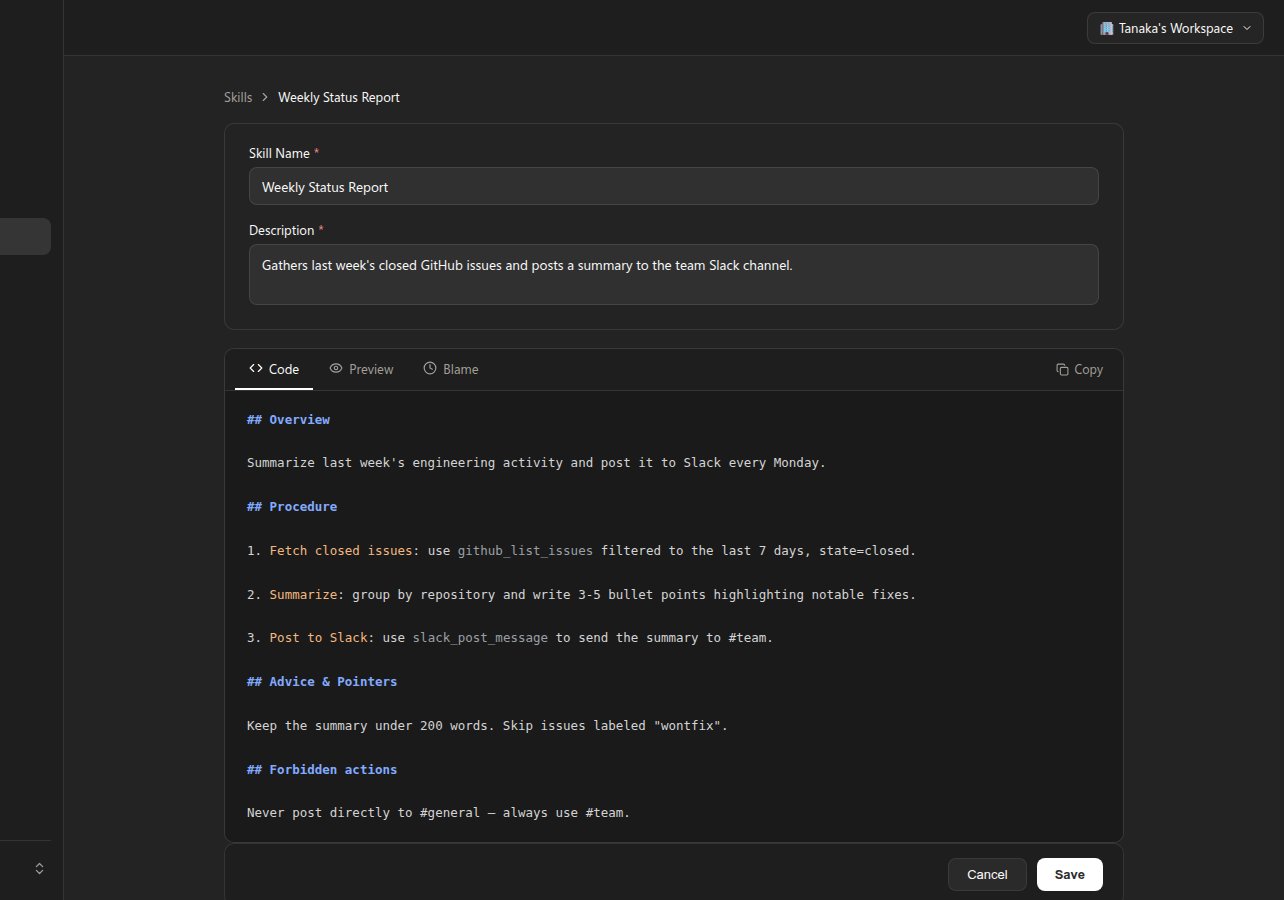 New Skills start from a small Markdown template (`## Overview` / `## Procedure` / `## Advice & Pointers` / `## Forbidden actions`) as a starting structure — you're free to deviate from it.
## Change history (Blame)
Every time a Skill's body is updated, Shanone keeps a full snapshot of the previous version internally. The **Blame** tab turns that history into a line-by-line view, similar to `git blame`: each block of lines shows who last touched it and when, color-coded from grey (older) to orange (most recently changed).
New Skills start from a small Markdown template (`## Overview` / `## Procedure` / `## Advice & Pointers` / `## Forbidden actions`) as a starting structure — you're free to deviate from it.
## Change history (Blame)
Every time a Skill's body is updated, Shanone keeps a full snapshot of the previous version internally. The **Blame** tab turns that history into a line-by-line view, similar to `git blame`: each block of lines shows who last touched it and when, color-coded from grey (older) to orange (most recently changed).
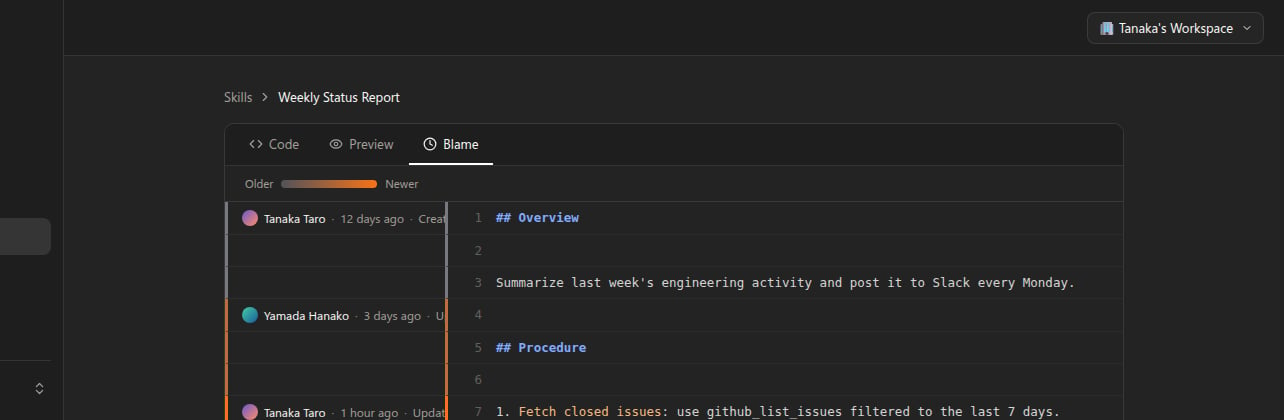 Blame is read-only. There's currently no button to restore an older version from this view — if you need to revert a change, copy the relevant text back into the Code tab yourself.
## Versioning
Every `shanone_update_skill` call increments the Skill's `version` counter, and Shanone records the full previous snapshot (that's what powers the Blame view above). There's no user-facing rollback API, though — treat `shanone_update_skill` as a full replacement of whichever fields you pass, and keep your own copy of anything you might want to revert to outside of what Blame lets you inspect.
Deleting a Skill with `shanone_delete_skill` is permanent and cannot be undone.
## Next steps
Full parameters and example requests/responses for every Skill Vendor tool
Skills are per-user today — see how tool/service access is controlled per team member
Blame is read-only. There's currently no button to restore an older version from this view — if you need to revert a change, copy the relevant text back into the Code tab yourself.
## Versioning
Every `shanone_update_skill` call increments the Skill's `version` counter, and Shanone records the full previous snapshot (that's what powers the Blame view above). There's no user-facing rollback API, though — treat `shanone_update_skill` as a full replacement of whichever fields you pass, and keep your own copy of anything you might want to revert to outside of what Blame lets you inspect.
Deleting a Skill with `shanone_delete_skill` is permanent and cannot be undone.
## Next steps
Full parameters and example requests/responses for every Skill Vendor tool
Skills are per-user today — see how tool/service access is controlled per team member