> ## Documentation Index
> Fetch the complete documentation index at: https://docs.shanone.ai/llms.txt
> Use this file to discover all available pages before exploring further.
# Automations
> Manage and automate your tasks with emma's automation features
## Overview
emma's automation feature allows you to automate tasks and set up recurring workflows with ease.
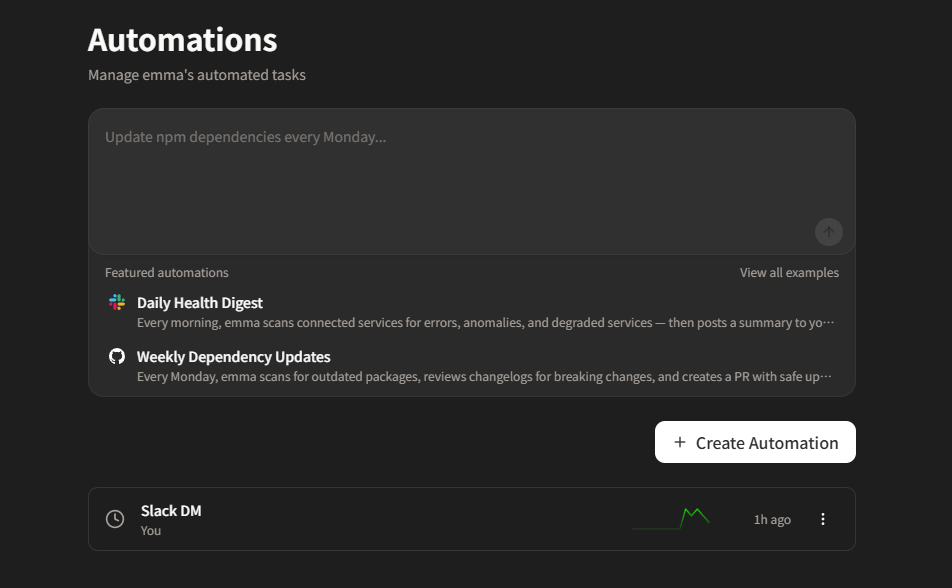 With emma's Automations feature, you can:
* **Automate recurring tasks** - Set up tasks to run automatically at specified intervals
* **Time-based triggers** - Execute actions based on specific dates and times
* **Smart scheduling** - Let emma optimize your automations for maximum efficiency
## Getting Started
Navigate to the Automations section from your emma dashboard.
Click "New Automation" and configure your task settings.
Choose how often you want the task to run (daily, weekly, monthly, or custom).
Review your settings and activate the automation.
## Automation Types
Execute a task at a specific date and time
Set up tasks that repeat on a regular basis
Trigger tasks based on specific conditions
Create sequences of tasks that run in order
## Best Practices
Consider time zones and peak usage hours when setting up automations to ensure optimal performance.
Give your automations clear, descriptive names so you can easily identify them later.
Regularly review your automated tasks and adjust timing as needed based on results.
With emma's Automations feature, you can:
* **Automate recurring tasks** - Set up tasks to run automatically at specified intervals
* **Time-based triggers** - Execute actions based on specific dates and times
* **Smart scheduling** - Let emma optimize your automations for maximum efficiency
## Getting Started
Navigate to the Automations section from your emma dashboard.
Click "New Automation" and configure your task settings.
Choose how often you want the task to run (daily, weekly, monthly, or custom).
Review your settings and activate the automation.
## Automation Types
Execute a task at a specific date and time
Set up tasks that repeat on a regular basis
Trigger tasks based on specific conditions
Create sequences of tasks that run in order
## Best Practices
Consider time zones and peak usage hours when setting up automations to ensure optimal performance.
Give your automations clear, descriptive names so you can easily identify them later.
Regularly review your automated tasks and adjust timing as needed based on results.